


Flashloop: AI Video Generator
4.6553.00 Reviews
App Specs
- Version
- 1.0.47
- Updated On
- License
- Free
- Downloads
- 500,000+
- Developer
- Buy Beaver
- Categories
- Art & Design
- Platform
- Android
Screenshots
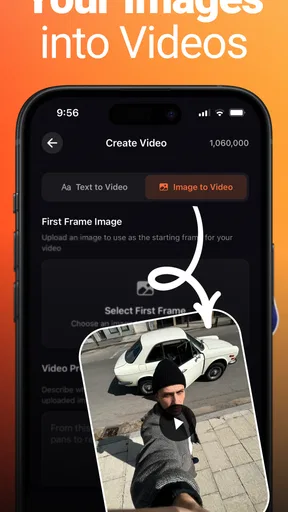
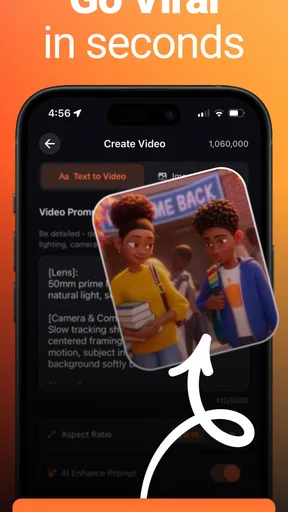
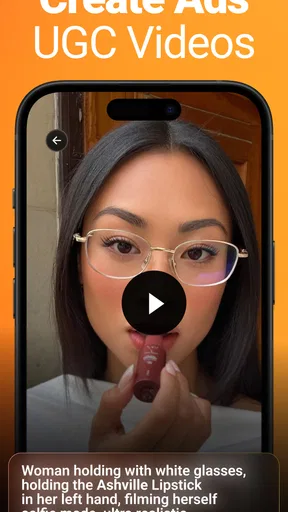
 Analysis by AppCompare
I reach for a quick video-making tool when I have a handful of clips but no clear edit in mind. Flashloop: AI Video Generator is aimed at that moment: it is an art-and-design app from Buy Beaver, built around turning video material into something ready to share. I see its appeal less as a replacement for a full editing suite and more as a way to get from “I filmed this” to “I can post this” without spending an evening learning a timeline.
Starting with a pile of clips
A useful test is an ordinary day out: I film a few short moments at a market, then want to share a compact recap with friends. The hard part is rarely recording; it is choosing what to keep, finding a rhythm, and making the result feel intentional. Flashloop’s central promise is AI-assisted video creation, so the natural place to start is with footage and a clear idea of the mood or purpose I want the finished piece to have.
That small bit of planning makes a difference. Before adding anything, I would sort clips into a rough order and decide whether the video is meant to feel lively, calm, or informative. This gives any automated edit a better starting point than a camera roll full of unrelated moments. It is a practical tip for this kind of app: AI can speed up choices, but it cannot know which moment matters most to you.
Moving from input to a first cut
The workflow is most useful when I treat the generated edit as a draft, not a finished verdict. I would bring in the footage, review the suggested arrangement, and check whether the opening establishes the subject quickly. If an edit starts with a weak or confusing shot, even attractive transitions will not fix the story. A short opening clip that clearly shows the place, person, or activity often gives the rest of the video a reason to exist.
For a small business owner, the same approach can turn a few product or behind-the-scenes clips into a simple social post. I would keep the message narrow: show one item, one process, or one moment rather than trying to squeeze an entire business into a short edit. A creator making a personal recap can be looser, while someone communicating practical information should favor clarity over effects. That distinction helps prevent a template from deciding the tone for you.
The app is free to download, with in-app purchases ranging from $4.99 to $199.99 per item. I would begin by checking what the free experience can do with a real project before paying to unlock anything. The wide price span makes it especially sensible to judge the value against a specific need—such as a style or tool you expect to use repeatedly—rather than assuming a paid option is necessary for a one-off clip.
From first cut to something shareable
I use the handoff from a first cut to a finished post as the real test: the edit should make sense outside the app, not just look appealing in its preview. I’d decide who needs to see it and what they should notice before making final tweaks, then check the result on a phone-sized screen. That practical review also helps show where a quick, AI-guided workflow is useful—and where I’d want more direct control.
Worth Reading Before You Choose

EA SPORTS FC Mobile 26 Is a Bigger Football Game, but It Takes Time

Flipboard Shows What News Apps Must Do Beyond the Feed

Switching to Android Auto Means Rethinking Your Driving Routine

Google Calendar Makes a Crowded Week Easier to Manage

Ludo King Makes the Most of the Minutes Between Plans

Baby Panda World Brings Quick Play to Modern Phones, but Its Game Library Feels Busy
Reviewing the edit instead of accepting it blindly
Automated editing can help with pace, but the final check is still personal. I would watch the video once without pausing, then watch again with a more practical eye: does the sequence make sense, is any shot held too long, and can I understand the point if the sound is off? This second pass catches problems that are easy to miss while tapping through individual clips.
Think about handoffs, too. A video that leaves the app may go to a social feed, a group chat, or a colleague who needs to approve it. Each destination changes what “finished” means. A personal montage can prioritize atmosphere; a product post needs to show the important detail clearly; a work clip may need a clean ending that does not feel abruptly cut off. I would decide the destination before polishing, so I am not making an edit that looks good in preview but does not suit its eventual use.
Flashloop is rated for Everyone, has a 4.5 average from around 23,000 ratings, and has passed 100,000 installs. Those figures suggest that it has found an audience, but they do not tell me whether its particular editing style fits my taste. I would use a low-stakes first project to judge that for myself: a short recap or casual post is a better trial than a client deliverable or an important announcement.
Where convenience has limits
The main trade-off with an AI-led workflow is control. A quick first cut is valuable when I do not want to edit every beat by hand, but the app’s choices may not match the exact timing or visual emphasis I had in mind. If a video depends on precise pacing, detailed sound work, layered graphics, or carefully controlled color, a traditional mobile editor or desktop program is likely a better fit. Flashloop makes more sense when speed and a presentable starting point matter more than frame-by-frame authorship.
There is also a useful distinction between decoration and communication. Effects can make a casual montage feel lively, but too many competing treatments can distract from the people or product in the footage. I would choose one visual direction and keep checking that the subject remains easy to see. For an informational clip, restrained editing is usually a stronger choice than piling on transitions simply because they are available.
Who should try it—and who may prefer another tool
I would recommend giving Flashloop a try if you often capture short clips, want a quicker route to a social-ready edit, or find a blank timeline discouraging. It is particularly suited to people who value a guided starting point and are happy to make a few choices after automation has done some of the organizing. The version listed is 1.0.34, and the minimum operating-system requirement is 7.0, details worth checking against your device before building a workflow around it.
I would skip it as my main editor if my work depends on exact cuts, detailed audio mixing, extensive manual control, or a consistent visual system across many deliverables. In those cases, the extra time spent with a conventional editor can pay off in repeatability and precision. Flashloop’s free entry point makes experimentation approachable, but in-app purchases mean I would inspect the available options carefully before treating it as a long-term production tool.
What I would check before sharing
My practical finishing routine would be simple: watch the whole video, check the first and last moments, confirm any text is readable on a phone, and make sure the most important action is visible. If the piece is for someone else, I would also send a preview before calling it done. That small handoff catches mismatched expectations early, especially when the creator and viewer have different ideas about the intended tone.
For a first project, choose footage with a clear subject and keep the goal modest. A short sequence of a meal being prepared, a walk through a neighborhood, or a quick look at a handmade item gives the editing process enough structure without making the result high-stakes. If the first cut feels too busy, remove or replace material rather than adding more effects. This is often the fastest way to improve an AI-assisted edit: simplify the input and let the strongest moments carry it.
First impressions
Upon launching Flashloop: AI Video Generator, I was greeted with a sleek and intuitive interface. The app doesn’t bombard you with unnecessary options, which I appreciated. It’s straightforward and gets you right into the action without any fuss. I could easily navigate through the menus, which is a big plus for anyone who doesn’t want to spend hours figuring out how to use new software.
Features that impress
The standout feature for me is the AI-powered editing. You can simply upload your raw clips, and the app does its magic. It analyzes your footage and suggests edits that make your video look professionally crafted. This is perfect for those who might not have the technical skills or the time to edit videos manually.
The app offers a wide variety of templates and effects. From dynamic transitions to creative overlays, there’s something for every style. I particularly loved the music integration feature. The app automatically syncs music with your video’s beat, giving it a polished look and feel. It’s like having a DJ mix your tracks perfectly with your visuals!
User experience
The ease of use is incredible. Even if you're not tech-savvy, the app guides you through each step. I found the drag-and-drop functionality to be super helpful. You can rearrange clips, add text, and even adjust the speed of your video with just a few taps. The real-time preview is also a huge bonus, as it lets you see the changes instantly without any lag.
One thing I really appreciated was the community aspect. The app allows you to share your creations and see what others are making. It's not just an editing tool but also a platform for inspiration. Seeing other users' videos sparked some creative ideas for my own projects.
Performance and reliability
Performance-wise, the app runs smoothly on both Android and iOS. I didn’t experience any crashes or major slowdowns, even when working on longer videos. The rendering time is impressively fast, which is perfect for anyone who needs to churn out content quickly.
Battery usage is reasonable. I used it extensively for a couple of days, and while it does consume more power than some simpler apps, it's nothing too alarming. Just make sure you’re not running on low battery if you plan on doing extensive editing.
Pricing and accessibility
Flashloop is free to download with a host of features available at no cost. However, there are premium options for those who want to unlock additional templates and effects. In my opinion, the free version offers plenty for most users, but the premium features are a worthwhile investment if you’re looking to take your videos to the next level.
The app also supports multiple languages, making it accessible to a broader audience. It’s clear that the developers have put a lot of thought into making this app as inclusive as possible.
Final thoughts
Overall, Flashloop: AI Video Generator is an impressive tool for anyone looking to enhance their video creation process. Whether you’re a budding influencer, a business owner, or just someone who loves making videos, this app has something to offer. The AI editing capabilities save time and effort, while the variety of templates and effects allow for endless creativity.
If you haven’t tried it yet, I’d definitely recommend giving it a go. It’s not just about creating videos; it’s about telling stories in a way that’s engaging and visually stunning. So go ahead, download the app, and let your creativity run wild!
Pros
- Intuitive and user-friendly interface.
- Quick video processing time.
- Wide range of AI effects available.
- Seamless social media sharing.
- Supports multiple video formats.
Cons
- Limited free version features.
- Occasional AI glitches.
- Requires a stable internet connection.
- High battery consumption.
- No offline editing options.
FAQs for Flashloop: AI Video Generator
What is Flashloop: AI Video Generator?
Flashloop: AI Video Generator is an innovative app designed to help users create high-quality videos using AI technology. It offers a variety of templates and editing tools that allow you to customize your videos effortlessly. Whether for personal projects or professional use, Flashloop streamlines the video creation process with minimal effort.
What features does Flashloop offer?
Flashloop provides a wide array of features, including AI-driven video editing, customizable templates, and a library of effects and transitions. Users can also access stock footage, music tracks, and text overlays. The app is user-friendly, making it suitable for both beginners and experienced video editors looking for quick results.
Is Flashloop available for both Android and iOS?
Yes, Flashloop: AI Video Generator is available for download on both Android and iOS platforms. Users can find it on the Google Play Store and the Apple App Store, ensuring that you can create stunning videos regardless of your device preference.
Are there any subscription costs or in-app purchases?
Flashloop offers a freemium model, meaning the basic version of the app is free to use. However, there are premium features and content that can be unlocked through in-app purchases or a subscription plan. This includes advanced editing tools, exclusive templates, and additional media content.
How user-friendly is Flashloop for beginners?
Flashloop is designed with user-friendliness in mind, making it an excellent choice for beginners. The intuitive interface guides users through each step of the video creation process, from selecting templates to applying effects. Tutorials and customer support are also available to help users maximize the app's capabilities.


